← Knowledge base

Time tracking

Real-time management: what hours tell you mid-contract

30 June 2026 · 7 min read

Month-old hours arrive too late for three decisions out of four. An example of what the gap between a week and a month costs, and three figures for the weekly meeting.

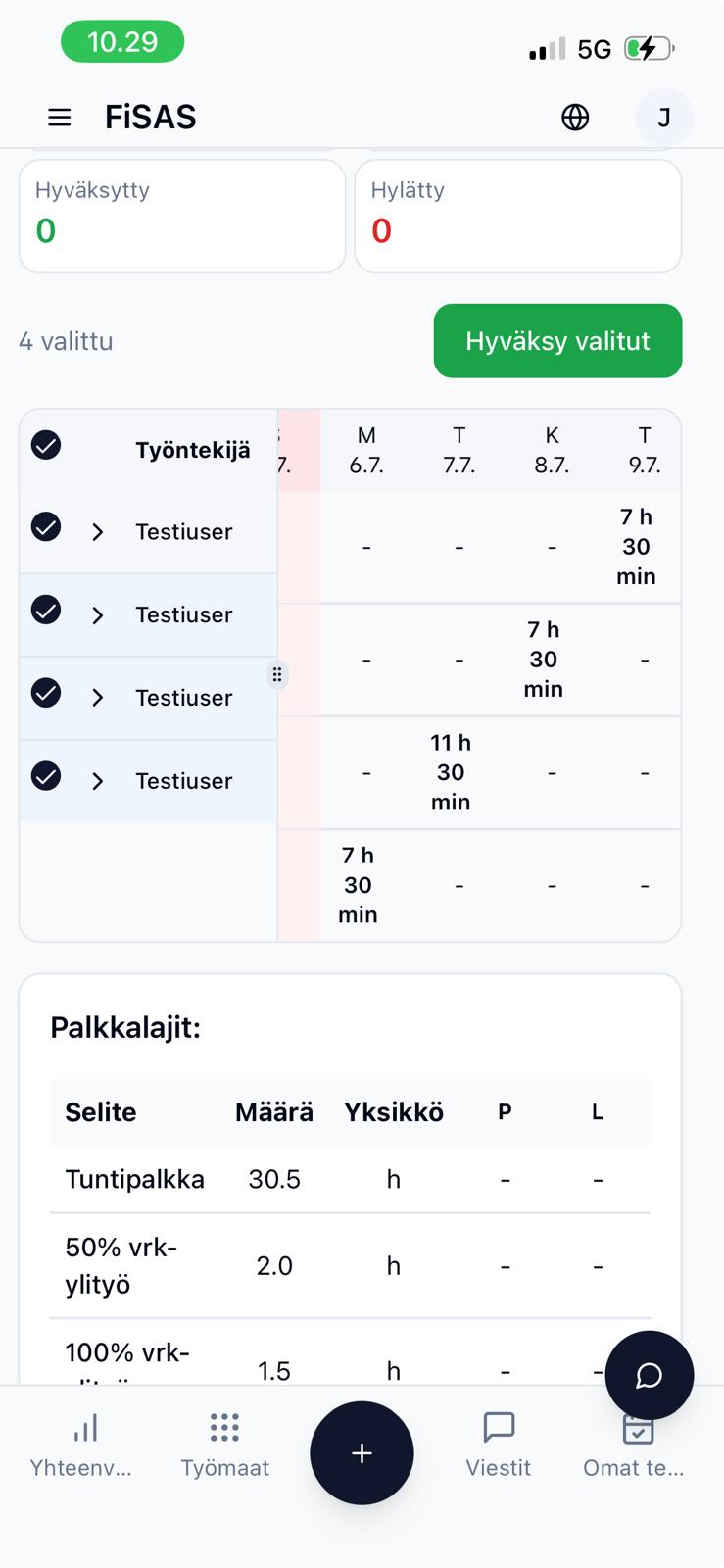
A supervisor reviews a worker's time entries on a phone

A month-old hours figure is history

When a site's hours only become clear in the middle of the following month, at payroll time, the information is correct but late. By then the contract has gone either well or badly, and neither can be changed.

In construction this matters more than in most industries, because projects are short. On a two-month renovation, a one-month delay means half the work is done before any figure shows anything.

This article looks at which decisions hours data drives, what a delay costs, and which three figures are enough for a small construction company's weekly meeting.

Four decisions that hours drive

Staffing. Is the crew enough for this phase, or should people move from another site? The decision is made within days, at most a week.

The price of extra work. When the client asks for a change, they want a price the same day. A good answer is based on how many hours similar work has actually taken before.

The call to the client. If a contract is running over, it needs to be raised before the overrun has happened. Before, the conversation sounds like this: "this phase is taking more than estimated, shall we look at it together". Afterwards it sounds like this: "the invoice is bigger than agreed". The first is project management, the second easily becomes a dispute.

The next quote. The only one of the four where a month's delay is fine. Historical data can be old as long as it is correct and recorded by work phase.

For three of the four decisions, month-old information arrives too late. Yet many small construction companies gather hours once a month because that is when payroll needs them. The payroll rhythm has ended up deciding what information the sites are managed with.

Example: what the difference between a week and a month costs

A detached house bathroom and kitchen renovation, budgeted at 400 working hours over two months. After demolition it turns out the floor structure under the bathroom is rotten, which was not in the quote. Repairing it and the slower progress add 40 hours to the contract, 30 of them directly from the floor structure.

Hours once a month. The overrun shows up in payroll a month later. By then the floor structure has been repaired, nobody recorded it as extra work, and the client has already paid the first instalment of the contract price. Justifying extra work after the fact is difficult, and the 30 hours often end up as the contractor's cost. With labour costing around 40 euros an hour including overheads, about 1,200 euros comes off the margin. About 1,650 euros goes uninvoiced at an hourly rate of 55 euros.

Hours every week. At the end of the first week, the supervisor sees that demolition and the floor structure have taken clearly more than estimated. The client is called the same week, shown photos of the rotten structure, and the repair is agreed as extra work before it is finished. The 30 hours are invoiced, and the client knows in advance that the invoice will grow.

The difference is not which figure is more precise. It is whether the information arrives in time to affect the decision. The shorter the contract, the more this matters.

Budget and actuals: both need to be fresh

Comparing budget with actuals only helps if the actuals are up to date. In practice they lag for two reasons. Hours arrive a week late if they are written up from memory on Friday. Purchases arrive with the supplier invoice, at worst a month later.

Together these make the figure misleading: the project looks under budget because some costs have not arrived yet, and decisions are made on a figure that will rise later. For hours, the fix is recording them on the day by phone. For purchases, it helps to record large orders against the project when they are placed rather than when the invoice arrives.

Approval improves or spoils the data

Approving hours feels like an administrative formality, but it is the only point where someone other than the person recording looks at the entries.

Done well, approval corrects hours booked to the wrong project while the worker still remembers what they did. It reveals deviations in the same week. And it tells the person recording that entries are actually looked at, which is the most effective way to improve their quality.

Done badly, approval is a button pressed once a month for all rows at once. It does not improve the data, but it gives the impression that the data has been checked. A good test is simple: if approval has never led to a single correction, it is not really being done.

For extra work, one more step works well: the client signs off on site. When the client confirms the extra hours the same day, there is nothing to discuss at invoicing time.
Try FiSAS for free, 14 days, no payment details.

Start trial

Three figures for the weekly meeting

The most common way monitoring fails is too much information. A dashboard with thirty metrics is not looked at, because reading it takes longer than visiting the site. Three figures are enough for a small construction company when they are checked in the same order every week.

1. Hours used against budget, by project. Not a euro amount but a ratio to progress. A contract that has used 60 percent of its hours with roughly half the work done is more interesting than one that has used more hours but is progressing in line.

2. Missing entries. How many workers have no entry for the current week? This measures data quality. If it grows, the other figures become unreliable, and nothing else will tell you.

3. Uninvoiced work. Work done and approved extra work not yet invoiced. This is cash flow directly, and in a small company it is often the figure that decides the month.

Checking three figures takes five minutes. The supervisor looks at their own site daily on a phone, the owner compares sites weekly, and the accounting stays on its monthly rhythm. Problems start when all three are expected to work from the same monthly report.

When a figure looks bad

The first month of up-to-date monitoring usually looks worse than earlier months, because now you can see what you could not see before. That does not mean something broke. The gauge started working. Three habits help at that stage.

First check whether the figure is right. If progress has not been updated, the hours look worse than they are. If a subcontract is missing, things look better than they are.

Look at the direction. A single week swings, a three-week direction does not. Reacting to one bad week means making decisions based on noise.

Do not look for someone to blame. If the first overrun means someone has to explain themselves, the next overrun will not show in the figures, because it will disappear into less accurate entries. A bad figure is a reason to visit the site, not a reason to criticise.

What hours data does not tell you

Real-time hours data does not replace a site visit, and it is fair to say what it cannot do.

A subcontractor's progress does not show in your own time entries unless the subcontractor records in the same system. It has to be asked about or estimated.

Quality and completion do not follow from hours. Two hundred hours can mean half done or almost done.

Purchase invoices arrive at the supplier's pace, and no system speeds that up. The cost picture sharpens as invoices come in.

Hours data tells you where to go and look. The decision is still made on site.

When several sites run at once

The typical situation for a small construction company is not one large site but four small ones. Then the key question is not whether a contract will run over, but which one will. Answering that requires every site to record hours the same way. If one site records by work phase and another only by project, the sites cannot be compared.

That is why it pays to make recording consistent before spending time on monitoring. Four average datasets recorded the same way are more useful than four good ones recorded differently. The real benefit of monitoring is often moving people from one site to another at the right time.

How this works in FiSAS

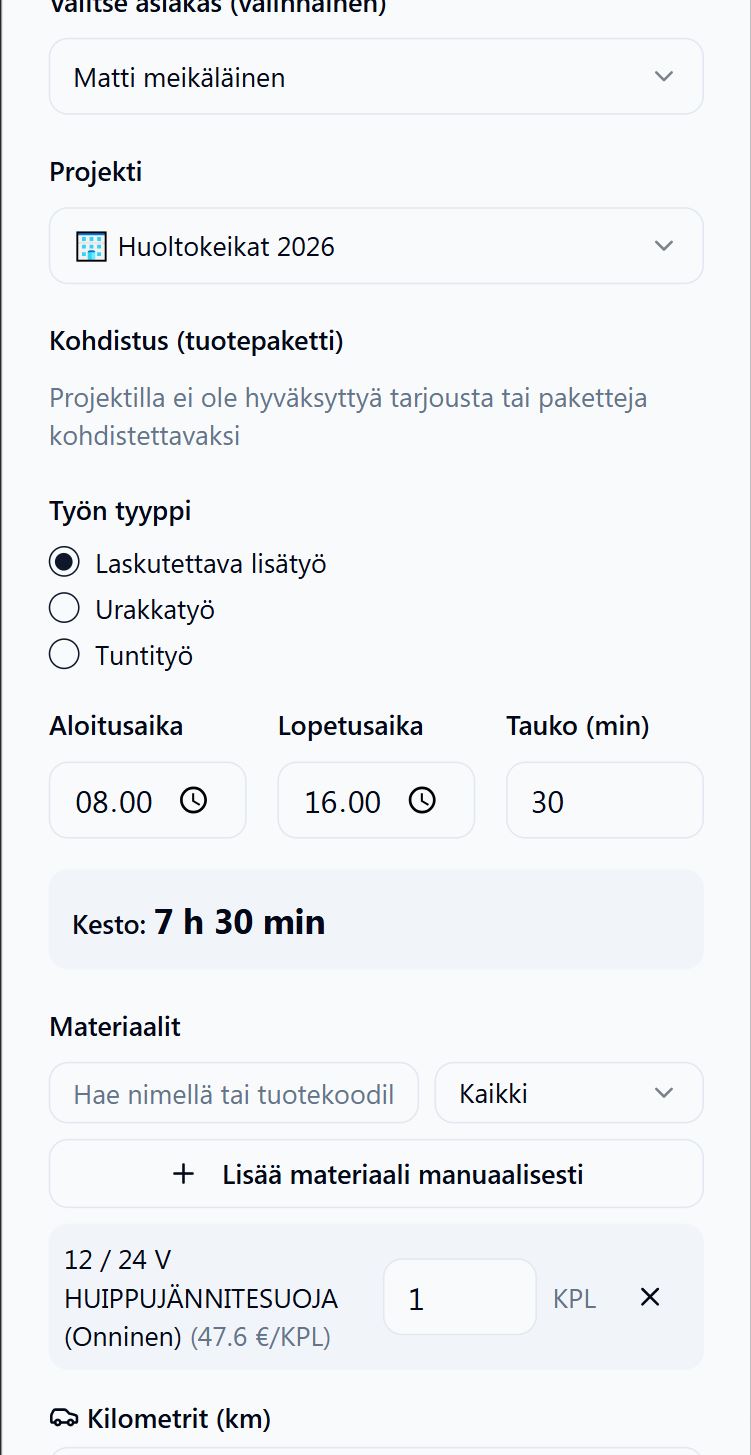
In FiSAS, hours are recorded on a phone on site in a few taps, even without a connection. The location is stored with the entry, and the client can sign off working hours directly on mobile, so extra hours are approved in the field.

A worker recording hours on a phone

Management sees the hours immediately, and they flow into the project's cost tracking. Budget is compared with actuals at the tracking level the company has chosen, for example by cost code, with labour, materials and subcontracting on separate rows, deviations are shown in euros and percent, and project margin and uninvoiced work update as hours are recorded and purchases made. Approved hours and extra work move to the invoice, and invoices transfer to accounting in Netvisor, Procountor or Fennoa.

Time tracking is included in every plan, including the single-user Maker plan. Invoicing and accounting integrations are in the Builder and Master plans, and purchase invoices against projects in the Master plan.

The first step

Pick one running contract and check its hours once a week against budget and progress. If the figure tells you nothing new, your monitoring is already in order. If it does, you have found the point where old information has been costing money.

You can run this trial in FiSAS free for 14 days. One site and the crew's hours recorded by phone are enough, and after two weeks you will see the week's figures in the same week for the first time.

Try FiSAS for free

14 days, no payment details, no commitment.

Start free trial